Rankings don’t disappear in a Wix move. They get lost one URL at a time.
Google ranks pages, and it knows those pages by their addresses. When a client’s site moves from Wix to WordPress, almost every one of those addresses changes. Blog posts lose their /post/ prefix, product pages lose /product-page/, and category pages get a new home. Each old address that doesn’t point somewhere new becomes a 404. Each 404 is a page Google has to forget, along with the links pointing at it.
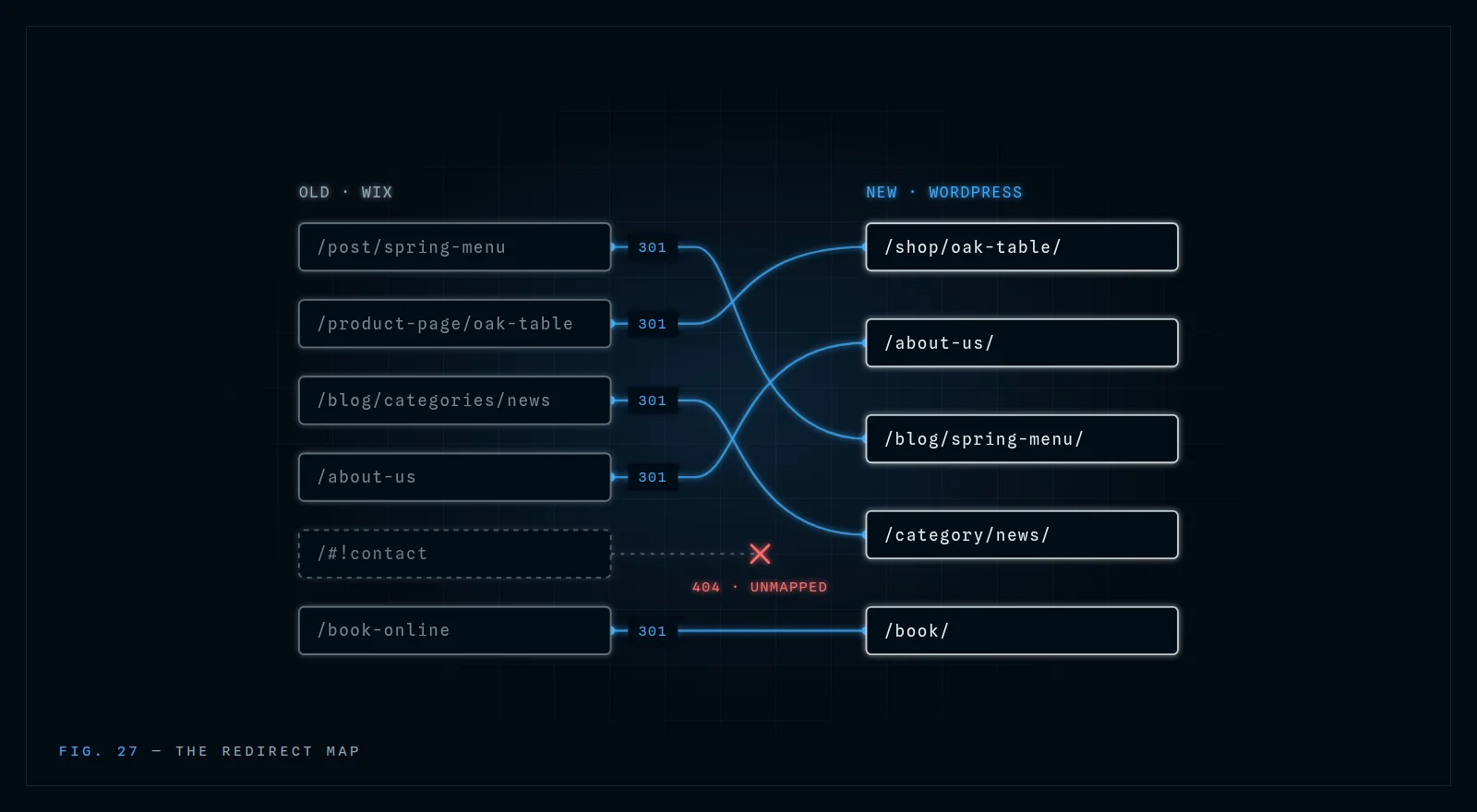
The fix isn’t complicated. It’s a spreadsheet: every old URL in one column, its new home in the next, and a permanent redirect between them. That’s the redirect map. This post walks through building one, from the first inventory to the thirty days after launch.
Why Wix moves lose rankings
Wix builds URLs its own way, and WordPress builds them differently. A few patterns cover most of a typical Wix site:
- Blog posts live under
/post/, as in/post/spring-menu. WordPress usually puts them at/spring-menu/or/blog/spring-menu/. - Store products live under
/product-page/. WooCommerce uses/product/or a custom shop base. - Blog categories live under
/blog/categories/. WordPress uses/category/. - Bookings, events and CMS dynamic pages each get their own prefixes, which a site owner can rename.
Both the blog and store prefixes can be changed in Wix’s SEO settings, so don’t assume the defaults. Read the real URLs from the site itself (step 1 covers how).
The second trap is timing. Wix has its own redirect manager, and it’s tempting to set up redirects there before the move. But redirects run on whatever server the domain points to. The moment DNS switches to the new WordPress host, Wix stops answering for that domain, and every redirect set up inside Wix stops working. The redirects have to live on the new site.
Step 1: Inventory every URL
You can’t redirect a page you don’t know exists. Build the list from four sources, because each one catches pages the others miss:
- The Wix sitemap. Open
clientsite.com/sitemap.xml. On Wix it’s an index that links to sub-sitemaps for pages, blog posts, products and so on. Open each one and copy out every URL. - Google Search Console → Pages. Export the indexed pages. This catches old URLs Google still knows about that the sitemap has dropped.
- Search Console → Performance. Export the pages with clicks over the last 12 months. These are the URLs that matter most, so they get checked first on launch day.
- Search Console → Links → Top linked pages. These are the URLs other sites point at. A missing redirect here loses the link as well as the page.
Combine the four lists and remove duplicates. For a small business site, expect somewhere between a few dozen and a few hundred URLs. Now crawl the live Wix site with a tool like Screaming Frog (free up to 500 URLs) and export each page’s title, meta description and H1 alongside its URL. You’ll need those in step 3.
Step 2: Build the redirect map
Put the combined list in a spreadsheet with these columns:
| Old URL | New URL | Type | Priority | Status |
|---|---|---|---|---|
| /post/spring-menu | /blog/spring-menu/ | 301 | High | Tested |
| /product-page/oak-table | /shop/oak-table/ | 301 | High | Tested |
| /blog/categories/news | /category/news/ | 301 | Medium | Tested |
Priority comes from the Performance and Links exports: anything with clicks or backlinks is high. Status gets filled in on launch day.
A few rules keep the map honest:
- One old page, one new page. Redirect each URL to its closest match, not to the homepage. Google’s own guidance warns that redirecting lots of old URLs to the homepage can be treated as a “soft 404”, which means the old page’s value is dropped anyway.
- Use 301s. A 301 tells search engines the move is permanent and to pass the old page’s standing to the new one. A 302 says “temporary”, which is the wrong message for a move.
- No chains. Each old URL should land on its final address in one hop. If
/post/spring-menuredirects to/spring-menu, which then redirects to/spring-menu/, fix the map so it points at/spring-menu/directly. - Retired pages still need a home. If a page isn’t coming across, redirect it to the nearest relevant page, such as the parent category or a service that replaced it. Only let it 404 if nothing related exists.
- Keep the slugs where you can. If the new URL can reuse the old slug (
spring-menustaysspring-menu), do it. It makes the map simpler and the move smaller.
The finished map is also a deliverable. It shows your client, in writing, that every page was accounted for, so send it under your agency’s name. (If you’re using a partner for the build, it should come to you with nothing identifying them. Here’s how to check.)
Step 3: Carry the on-page SEO across
A redirect passes a page’s standing to its new address. It doesn’t protect the page if the content on the other end is different. Using the crawl from step 1, carry across for every important page:
- Title tags and meta descriptions, word for word to begin with. Improve them later, once rankings have settled, so you can tell what caused any change.
- H1s and heading structure. A rebuild is a tempting time to rewrite. Hold off on the pages that rank.
- Body copy. The same text, not a summary of it.
- Image alt text. Wix stores it per image and it rarely survives a copy-paste.
- Internal links. Update links inside the content to point at the new URLs directly, instead of leaning on the redirects.
- Structured data. If the Wix site had business, product or FAQ markup, rebuild it on the new site.
The new design can be completely different. The words and signals Google ranked the pages for should match on launch day.
Step 4: Launch day
- Load the redirects before DNS moves. Enter the map into Rank Math’s Redirections module (or a server-level rules file for large maps) on the new WordPress site, so the redirects are live the moment the domain arrives.
- Untick “Discourage search engines.” It’s in Settings → Reading, and it’s the most common launch-day mistake. Staging sites have it switched on for good reason, and it often travels to production.
- Switch DNS. Lower the TTL a day ahead so the change spreads quickly.
- Crawl the old URL list. Paste the full old list into your crawler’s list mode. Every row should return one 301 to a page that returns 200. Mark each row Tested in the map. Anything that returns a 404 or a chain gets fixed that day.
- Submit the new sitemap in Search Console. The domain hasn’t changed, so the existing property keeps working, and Google’s Change of Address tool isn’t needed. That tool is only for moves to a new domain.
Step 5: The first 30 days
Some movement after a migration is normal. Google has to recrawl the old URLs, follow the redirects and re-process the new pages, and rankings can wobble while that happens. What you’re watching for is movement that doesn’t settle.
For the first month, check these weekly:
- Search Console → Pages. “Page with redirect” rising is expected; those are the old URLs. “Not found (404)” rising is not. Each one is a gap in the map.
- Rank Math’s 404 Monitor. It logs every 404 as it happens, including URLs that never made it into any export. Add each one to the map.
- Performance, by page. Compare the high-priority pages against their pre-launch clicks. A page that drops and stays down usually has a content or redirect problem, not a Google problem.
Keep the redirects in place permanently. Old backlinks, bookmarks and email links don’t expire, and a redirect costs nothing to keep.
How we handle it
Every migration we run for an agency ships with the full URL map and redirect report, 301s on every changed URL, and 30 days of post-launch monitoring. It all goes out under your agency’s name. See how our white-label migrations work →
Want the bigger picture of how we work behind your agency? See how it works →
Frequently asked questions
Will a client’s rankings drop after moving from Wix to WordPress?
Some short-term movement is normal while Google recrawls the old URLs and follows the redirects. If every URL has a one-to-one 301 redirect and the content on each page stays the same, rankings usually settle back. Drops that last usually point to missing redirects, redirects to the homepage, or content that changed in the rebuild.
How long does Google take to process a Wix to WordPress migration?
Google’s own site-move guidance says a medium-sized site can take a few weeks or more before Google starts showing the new URLs in place of the old ones, and rankings may fluctuate in the meantime. Submitting the new sitemap and keeping the redirects clean, with no chains or 404s, helps Google get through the old URLs faster.
What about old Wix URLs with #! in them?
Older Wix sites used URLs like /#!contact. Everything after the # is never sent to the server, so a normal 301 redirect can’t see it. If old links with #! still bring traffic, a small script on the new homepage can read the fragment and send visitors to the right page. Most of these links are years old, so check your analytics before building anything.
Do images need redirects when moving off Wix?
Wix serves images from its own media servers, not from your client’s domain, so you can’t redirect them. Upload the images to WordPress with descriptive file names and the same alt text. Image search traffic will need to rebuild, but page rankings aren’t affected as long as the pages themselves are redirected properly.